Text
Display text using Kindle font and size presets.
Usage
Save this example as apps/Reader/App.js in the starter app.
import React from 'react';
import {Text, View} from 'react-kindle';

export default function App() {
  return (
    <View style={{padding: 24}}>
      <Text variant="h1">Library</Text>
      <Text>Continue where you left off.</Text>
      <Text variant="caption">12 books</Text>
    </View>
  );
}
Props
| Prop | Type / default | Description |
|---|---|---|
| children | text / text nodes | Text content. |
| variant | string = body | Typography preset. |
| size | number | Override base font size before scaling. |
| style | Text style | Color, alignment, and other text styles. |
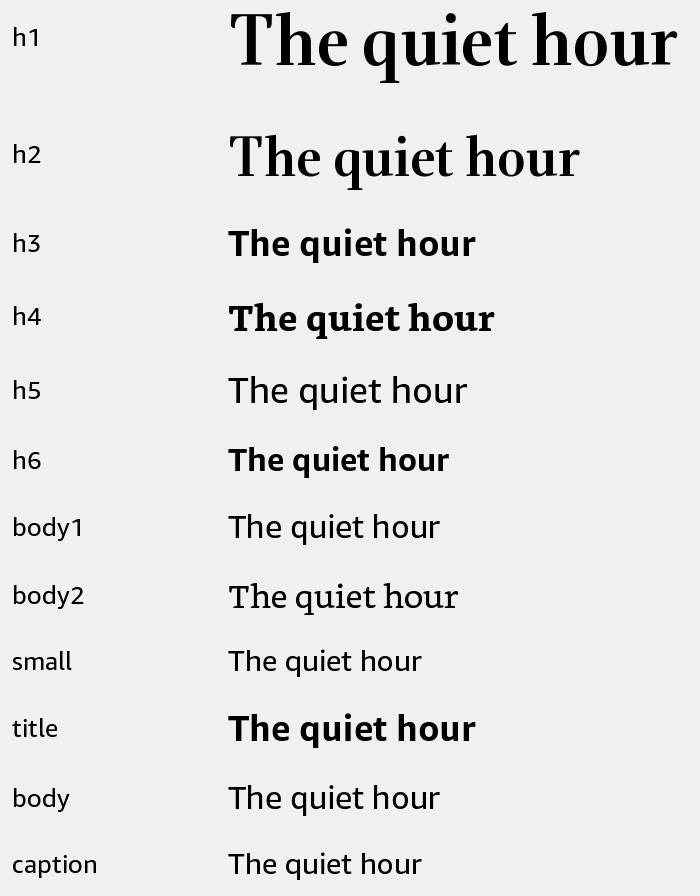
Typography presets
| Variant | Font | Size / line height | Weight |
|---|---|---|---|
| h1 | Bookerly Display | 36 / 56 | Normal |
| h2 | Bookerly Display | 28 / 40 | Normal |
| h3 | Amazon Ember | 20 / 24 | Bold |
| h4 | Bookerly | 20 / 24 | Bold |
| h5 | Amazon Ember | 20 / 24 | Medium |
| h6 | Amazon Ember | 18 / 24 | Bold |
| body1 | Amazon Ember | 18 / 24 | Normal |
| body2 | Bookerly | 18 / 24 | Normal |
| small | Amazon Ember | 16 / 20 | Normal |
| title | Amazon Ember | 20 / 32 | Bold |
| body | Amazon Ember | 18 / 26 | Normal |
| caption | Amazon Ember | 16 / 24 | Normal |
Font sizes follow the current font scale. The title, body, and caption presets also scale line height. Other presets keep the listed line height. Standard React Native text props are passed through.